CloverHub Script Steal An Egg — No Key, Steal Filter
CloverHub is a keyless Steal An Egg script built around a four-condition Steal Filter, rarity, category, area, and weight, so it only chases eggs actually worth the trip instead of grabbing everything indiscriminately.
CloverHub, Roblox Script
loadstring(game:HttpGet("https://raw.githubusercontent.com/Ryuun0x/Clover/refs/heads/main/main.lua"))()What Is the CloverHub Script?
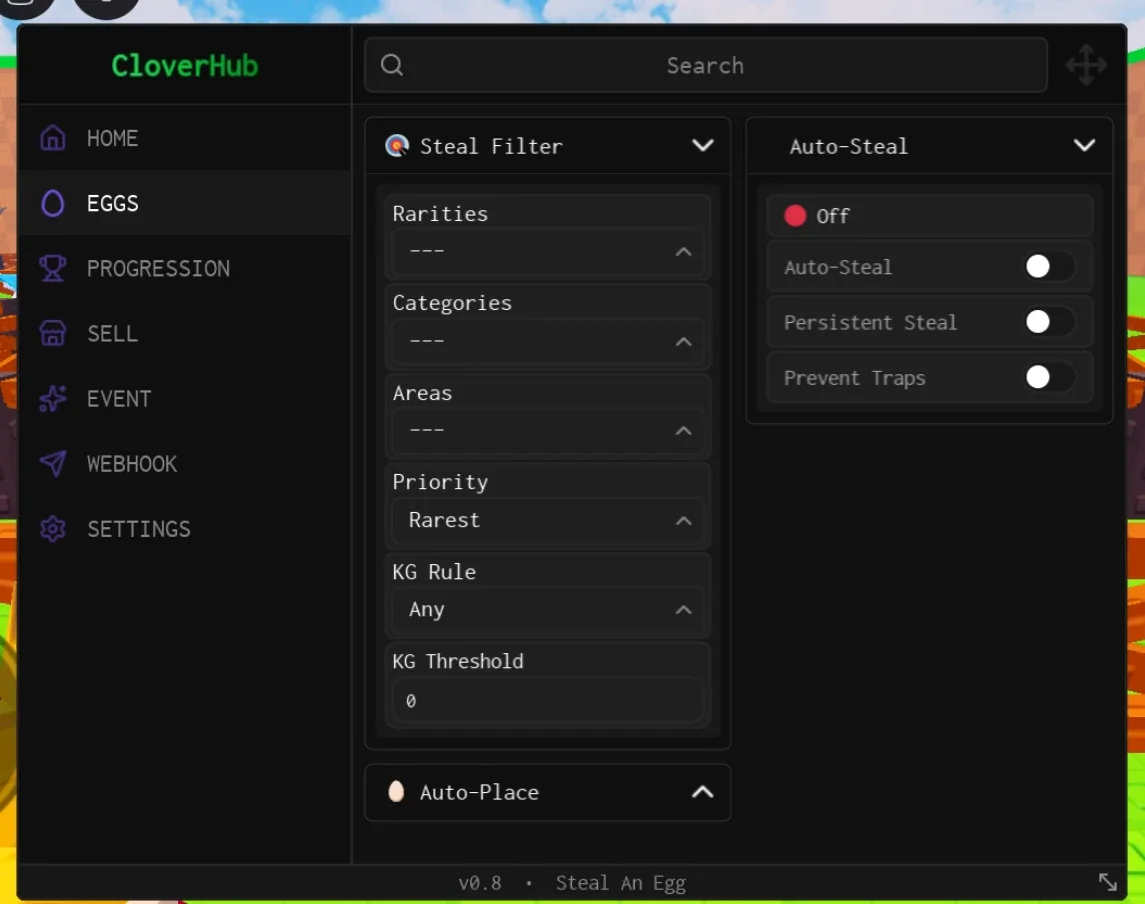
CloverHub's core idea is filtering before moving. Rather than a blanket auto-farm that spends a whole cycle carrying common eggs home, it applies rarity, category, area, and a weight threshold together, only chasing eggs that pass all four conditions.
A Prevent Traps feature actively routes around bear traps, which otherwise pin a character in place for several seconds and force a dropped carry, a detail that matters most on the return trip.
Persistent Steal keeps retrying a failed grab on the same egg instead of abandoning it and picking a new target immediately.
Feature Breakdown
Steal Filter
Rarities excludes lower tiers outright. Categories narrows by egg type. Areas limits the hub to biomes your character can actually survive, since running into a biome too fast for your speed can be fatal. KG Rule and Threshold exclude eggs above a chosen weight, since heavier eggs slow movement while carried.
- Steal Filter by Rarity
- Category and Area Filters
- KG Rule and Threshold
- Priority (Rarest)
Auto-Steal, Traps & Persistence
Auto Steal runs the core loop. Prevent Traps routes around bear traps, which matters most while carrying an egg home. Persistent Steal keeps attempting the same target instead of giving up after one failed grab.
- Auto Steal
- Persistent Steal
- Prevent Traps
Place, Sell & Extras
Auto Place and Quick Sell round out the loop, alongside event tools, a progression tracker, egg search, and Discord webhook alerts.
- Auto Place
- Quick Sell
- Event Tools
- Progression Tracker
How to Run the CloverHub Script
Open Roblox, join Steal An Egg, and wait for your plot to render.
Launch a compatible executor and attach it to the game.
Paste in a current, verified CloverHub loadstring and execute.
On the Eggs tab, set Rarities and Areas before anything else.
Turn on Prevent Traps, then Auto-Steal.
Add Persistent Steal only after the basic loop is confirmed working.
Is the CloverHub Script Safe?
A loadstring only runs Lua code inside Roblox, it doesn't install anything on your device directly. That said, real risks still apply:
- !Set the Areas filter first. Sending the script into a biome your character's speed can't handle is one of the most common ways a first run breaks.
- !Keep the KG threshold reasonable. A very low weight threshold means the script refuses almost every egg and can look broken when it's simply being selective.
- !Use a throwaway account. Standard precaution with any third-party automation.
Frequently Asked Questions
Other Keyless Hubs Worth Having
Keep a second hub bookmarked. Steal An Egg patches often and script authors update at different speeds, so having an alternative ready turns a broken script into a quick switch instead of a dead session.